Search every report, model and email your firm holds.

Silo indexes Windows file shares, Outlook, SharePoint, OneDrive and Teams, reads scanned PDFs and Rocscience models, and shows each person only what they can already open. It runs on your own hardware.

east wall UCS project:Ironbark
20 results · 0.04 s
PDF
FILE SHARE\\fs01\Projects\Ironbark\Geotech\Reports

Stage 3 East Wall Geotechnical Review, Rev B

p.14… laboratory UCS results from 42 samples of fresh BIF average 86 MPa. The east wall design adopts 24 m benches at 65° face angle …

2024ReportFeIron oreGeotech team
RS3
ROCSCIENCE RS3East wall section 4 v7.rs3v3

East wall section 4: slope stability model v7

Materials: Fresh BIF (UCS 86 MPa, GSI 55, mi 17) · Weathered shale · Dolerite dyke. 3 stages, critical SRF 1.32.

Model3 stagesGeotech team
MAIL
OUTLOOKFrom Priya Nair · 12 Mar 2025

RE: UCS batch 3 back from the lab

Last 12 cores are in. Two east wall samples failed along bedding, so I've flagged them in the attached sheet …

1 attachment · xlsxYou were cc'd
TEAMS
TEAMSIronbark Stage 3 › Geotech

Tom Reilly: can we rerun section 4 with the new UCS numbers?

Client wants the revised east wall FoS before the design review on Friday.

Channel messageTeam members

What people type into Silo

Plain words work. Filters narrow things down when you need them, and the filter list on the left updates as you go. These are the kinds of searches it was built for.

  1. "east wall" UCS project:Ironbark

    One search across every source

    The 2024 wall review opened at page 14, the RS3 model, the lab results email and the Teams thread about rerunning section 4.

  2. komatiite year:1995..2005

    Scanned reports, down to the page

    Old reports scanned to PDF are read with OCR, so a 1998 annual report matches on page 37 like a modern Word file would.

  3. type:rs3 material:BIF

    Models searched by what's in them

    Material names, strength parameters and stages come out of Rocscience files, so nobody needs a licence just to find the right model.

  4. commodity:gold has:location

    Documents on a map

    Coordinates, MGA references, tenement IDs and map sheet codes are read out of the text. Draw an area to see what you hold there.

  5. from:priya assays has:attachment

    Email and chat with the files

    Messages, attachments and Teams posts sit in the same results as the documents they discuss.

  6. project:2291

    Your project system, plugged in

    A plugin reads project numbers and folders from your project system, so one search returns everything for a job, wherever it was saved.

File types Silo reads

Most search tools stop at Office files and PDFs. Silo handles those, then adds plugins for the formats geoscientists and engineers use. Each format is its own plugin, so new ones can be added without changing the rest of the system.

FormatWhat Silo picks outStatus
Reports.pdf, scanned .pdf, .docxEvery page of text, with OCR for scans; titles, tenements, commodities, locationsAvailable
EmailOutlook, Exchange OnlineMessage text, people, dates and attachmentsAvailable
Spreadsheets.xlsx, .csvSheet names, headers and cell text such as hole IDs and assaysAvailable
Rocscience RS3.rs3v3, compute, resultsMaterials and strength parameters, stages, supports, resultsAvailable
Datamine.dmTable type, fields, extents and coordinate rangesIn development
Teamschats and channelsMessages by project, channel and personEnterprise

Search by location

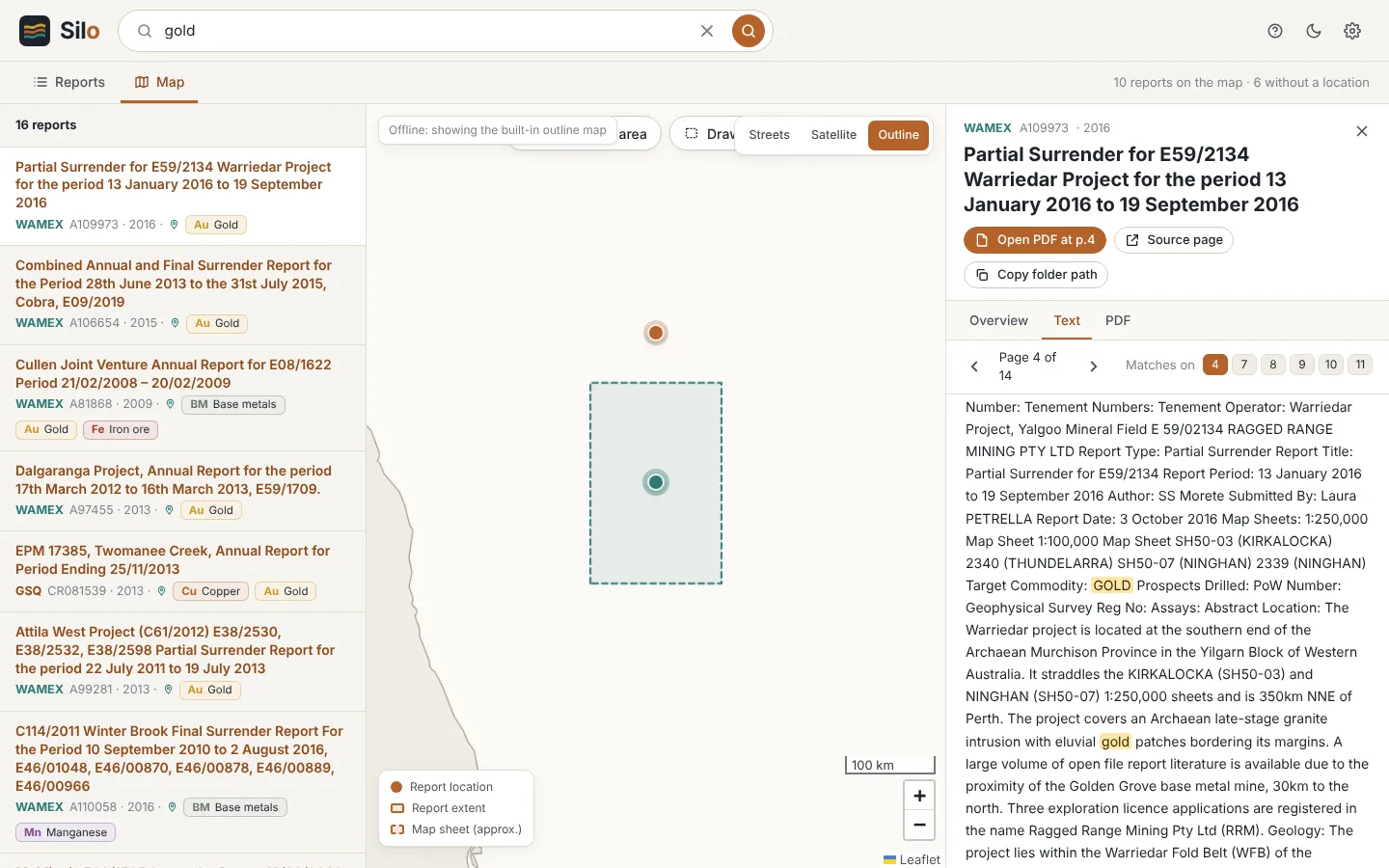
Technical documents usually say where they're about somewhere in the text, even when the file name doesn't. Silo finds those references and puts the document on the map.

It understands MGA zones, AMG grids, 1:250k and 1:100k map sheets, graticular blocks and tenement numbers. You can combine an area with any other filter, and the built-in outline map works without an internet connection.

Silo map view: a selected area on a map of Western Australia, with the matching exploration reports listed on the left and the report text open on the right with the search term highlighted.
Silo Server beta, searching 46,000 public exploration reports from WAMEX and GSQ.

Measured on a real archive

We test Silo against 46,850 public exploration reports from WAMEX and GSQ, many of them scanned. These are the numbers from a single workstation running the Silo Server beta. The organisation version spreads the same work across an index server and file-server agents, sized for shares of 70 TB.

Pages indexed
1,330,000
Index on disk
8.7 GB
Typical search
30–100 ms
OCR, in the background
~310 pages/min
Reports placed on the map
25,000

Silo Desktop and Silo for organisations

Both use the same search. Desktop covers one person's PC and Microsoft 365 accounts. The organisation version covers every share, mailbox and channel in the business, with permissions.

Silo Desktop

Free for personal use during the beta. Indexes your local drives, the mapped drives you choose, and Outlook and OneDrive across several Microsoft 365 accounts. The index stays on your PC and nothing is sent to TekOne.

Installer coming soon Windows 10 or 11, 64-bit

Silo for organisations

Installed on your own servers, one instance per firm. Indexes file shares of tens of terabytes, including deduplicated volumes, plus all of Microsoft 365, and checks access on every search. Licensed per site, with a pilot programme open now.

Pilots run against a sample of your own data, on your own hardware.
Silo DesktopSilo for organisations
Who searchesYou, on your PCEveryone, from their PC or a browser
Local drivesYesThrough Desktop
Network file sharesMapped drives you pickWhole servers, indexed on site
Outlook / Exchange OnlineYour own accountsEvery mailbox, with access rules
SharePoint and TeamsOneDrive filesAll sites, chats and channels
Technical file pluginsYesYes, plus your own
Map searchComingYes
Where the index livesYour PCYour server, on your network

How the organisation version is set up

A small agent on each file server reads files and their permissions where they live, so nothing is copied across the network. The Silo server holds the index. People search from a small Windows app or a browser.

Your sources

File serversSilo agent reads files and NTFS permissions locally
Exchange OnlineMailboxes and attachments
SharePoint and OneDriveSites, libraries and sharing
TeamsChats and channels
Project systemProjects and their folders, by plugin

On your hardware

Windows Server · one per site · single tenant
  • IndexFull text, page by page, plus extracted fields and locations
  • PermissionsUsers and groups from Active Directory and Entra ID, applied to every query
  • PluginsEach source and file type runs in its own process
  • Admin portalSources, schedules, health and audit

Your people

Silo on the PCQuick search from the taskbar; also searches the PC itself
Web searchAny browser on the network, signed in with Microsoft
IT and adminsPortal for setup and monitoring

Results follow your existing permissions

Silo reads the access rules from each file share, mailbox, site and channel, and checks them on every search. A contractor only finds what their account could already open, and HR folders stay with HR. Pick a person to see the same search through their account.

  • If Silo can't confirm someone's access to an item, the item is left out.
  • People sign in with their Microsoft work account. Group changes in Active Directory or Entra ID carry through.
  • The index lives on your server. No copy goes to TekOne or a shared cloud service.
PNSearching as Priya NairGeotechIronbark project
  • PDF
    Stage 3 East Wall Geotechnical Review, Rev B\\fs01\Projects\Ironbark\Geotech
    Ironbark project
  • RS3
    East wall section 4 v7.rs3v3\\fs01\Projects\Ironbark\Geotech\Models
    Geotech
  • XLSX
    Ironbark fee proposal and rates 2025.xlsxSharePoint › Business Development
    Principals, Geotech leads
  • TEAMS
    Ironbark Stage 3 › Site access and inductionsTeams channel
    Ironbark project
  • MAIL
    Ironbark site roster and leave, Q2HR shared mailbox
    HR
  • PDF
    Contractor agreement, Ironbark site services\\fs01\HR\Contracts
    HR
Search: ironbark · 4 results. Items a person can't open are left out entirely, not counted or hinted at.

Questions

Is Silo Desktop really free?

Yes. Silo Desktop is free for personal use while it is in beta. We'd like to hear what you think of it, and if it would help your whole team, we'll talk to you about Silo for organisations.

Does any of my data go to TekOne or the cloud?

No. Silo builds its index on your own PC or server. Microsoft 365 content is read directly from Microsoft using your own sign-in, and stays on your hardware once indexed. Silo does not send your files, index or searches to us.

How does Silo know what each person is allowed to see?

For file shares, the Silo agent reads the NTFS permissions on each file and folder. For Microsoft 365, Silo reads the sharing and membership of each mailbox, site and channel. It resolves users and groups from Active Directory and Entra ID and checks them on every search.

If anything about an item's access is unclear, Silo leaves it out of results.

What file types can it search?

PDFs (including scanned PDFs, read by OCR), Word, Excel, PowerPoint, email and attachments, text and CSV files, and Rocscience RS3 models. Datamine files are in development. Other formats can be added as plugins.

How much data can it handle?

Silo for organisations is designed for file shares of 70 TB and more, with millions of files. Index size depends on how much text is in your data rather than raw terabytes: imagery, drawings and binary models add very little. Windows Data Deduplication volumes are supported.

What do we need to run it?

One Windows Server (physical or virtual) at the site where your data lives, a small agent on each file server, and an Entra ID app registration for Microsoft 365. We help set it up as part of the pilot.

We already have a search tool. Why switch?

Most search tools were built for office documents and struggle with large technical archives. They index slowly, use a lot of server resources and can't look inside geoscience files. Silo was built for exactly that kind of data, and we're happy to run it side by side with what you have now.

Is Silo only for mining companies?

No. We built it first with mining and geotechnical consultancies because their archives are some of the hardest to search, but it works for any firm on Windows and Microsoft 365.